


Most small business owners think about technology exactly twice a year. Once when something breaks. Once when the renewal invoice lands. That’s it.
And honestly? That pattern is expensive. The right IT solutions for small business owners aren’t a line item you tolerate — they’re the difference between a shop that scales and one that spends every Monday morning fixing printers. In 2026, with AI baked into everything and ransomware crews specifically hunting companies under 100 employees, that gap has widened.
This guide walks through what actually matters about IT solutions for small business: the categories of IT solutions for small business worth paying for, how managed services work in practice, what IT support services cost, and how to pick a partner without getting locked into a contract you regret. No fluff, no vendor-speak.
What IT Solutions for Small Business Actually Mean in 2026
Let’s define the term before we go further, because vendors use it loosely.
IT solutions for small business refers to the combined set of hardware, software, network infrastructure, security controls, and human support that keeps a company running. It covers everything from the laptop your bookkeeper uses to the firewall guarding your customer database. Most owners searching for IT support for small business needs are really searching for this whole bundle.
The scope has changed. Ten years ago, a small business IT stack meant a server in a closet, some desktops, and a guy named Raj who came in when Outlook stopped syncing. Today it means cloud identity management, endpoint detection, automated backups, VoIP, collaboration platforms, and increasingly, AI agents handling first-line customer queries.
Here’s the thing most owners miss: you’re already buying IT. You just may be buying it badly — in fragments, from six different vendors, with nobody accountable when things break.
The Three Delivery Models
In-house IT. You hire someone. Works if you’re over roughly 40 employees or run something technically complex. Below that, you’re paying a full salary for a person who’s idle half the week.
Break-fix. You call someone when things break. This is the cheapest form of IT support services and the most expensive form of risk. Cheap until it isn’t. One ransomware incident wipes out five years of “savings.”
Managed services. A provider monitors, maintains, and supports everything for a flat monthly fee. This is where most IT solutions for small business budgets land, and for good reason.
Why Small Businesses Can No Longer Wing It
The threat landscape did not scale down for smaller companies. If anything, it scaled toward them.
Attackers figured out something simple: small firms hold real money and real data but rarely have real defences. According to Verizon’s Data Breach Investigations Report, a substantial share of confirmed breaches now hit organisations with fewer than 1,000 employees. IBM’s Cost of a Data Breach research puts the global average incident cost well above USD 4 million — and while a 12-person accounting practice won’t lose that much, losing 40,000 dollars and three weeks of operations can end the business entirely.
Then there’s the compliance angle. India’s Digital Personal Data Protection Act, the EU’s GDPR, and sector rules like HIPAA and PCI-DSS apply regardless of headcount. Nobody gets a small business exemption for losing customer records.
Worth noting: insurance is tightening too. Cyber insurers now ask pointed questions about multi-factor authentication, endpoint protection, and backup testing before they’ll write a policy. Answer wrong and you either pay triple or get declined.
And the operational cost of doing nothing is quieter but constant. Every hour an employee spends fighting a slow machine or a dropped VPN is an hour of payroll producing nothing. Reliable IT support for small business teams pays for itself in recovered hours alone.
The Seven Core Categories of Small Business Technology
Rather than a shopping list of products, think in categories. Every solid stack covers these seven.
1. Network and Connectivity
Business-grade internet with a failover connection. A managed firewall — not the router your ISP handed you. Segmented Wi-Fi so guest devices never touch your finance systems. This is unglamorous and absolutely foundational.
2. Endpoint Management
Laptops, desktops, phones, tablets. You need centralised visibility: what’s connected, what’s patched, what’s encrypted. Tools like Microsoft Intune, Jamf, or NinjaOne handle this. Unmanaged endpoints are how most breaches start.
3. Identity and Access
Single sign-on plus mandatory multi-factor authentication. Role-based permissions so the marketing intern can’t open payroll. Offboarding that actually revokes access the same day someone leaves — you’d be amazed how often ex-employees still have live logins six months later.
4. Data Protection and Backup
The 3-2-1 rule still holds: three copies, two media types, one offsite. But add immutability — backups that ransomware can’t encrypt. And test restores quarterly. An untested backup is a rumour, not a safeguard.
5. Communication and Collaboration
Microsoft 365 or Google Workspace as the base. VoIP replacing landlines. Slack or Teams for internal chat. Video conferencing that doesn’t drop mid-pitch.
6. Business Applications
CRM, accounting, inventory, project management. Zoho, HubSpot, QuickBooks, Tally, Xero — pick based on your workflow, not on which had the best ad. Integration matters more than features; disconnected systems create manual re-entry, and manual re-entry creates errors.
7. Security Operations
Endpoint detection and response, email filtering, DNS filtering, vulnerability scanning, and security awareness training for staff. That last one is underrated. Your people are the attack surface.
Managed IT Services for Small Business: How the Model Works
This is the part owners find genuinely confusing, so let me break it down plainly.
Managed IT services for small business means outsourcing your technology operations to a provider — usually called an MSP — who charges a predictable monthly fee per user or per device. In exchange, they own the outcome, not just the ticket.
What’s Typically Included
- 24/7 monitoring of servers, endpoints, and network devices
- Patch management and software updates
- Helpdesk access for staff (phone, email, chat)
- Backup management and restore testing
- Antivirus, EDR, and email security administration
- Vendor coordination — they call your ISP so you don’t have to
- Quarterly strategy reviews and technology roadmapping
- Onboarding and offboarding of staff accounts as part of standard IT support services
What’s Usually Extra
- Hardware purchases
- Major project work (office moves, cloud migrations)
- Third-party software licences
- After-hours emergency response beyond the SLA
- Compliance audit preparation
The incentive structure is what makes this model work. Under break-fix, your provider earns more when things break. Under a managed agreement, breakage costs them money. Suddenly proactive maintenance becomes their self-interest.
Let’s be honest though — this only works if the contract has teeth. Vague SLAs and “reasonable efforts” language mean you have a subscription, not a service.
Break-Fix vs Managed IT: A Direct Comparison
| Factor | Break-Fix Model | Managed IT Services |
| Cost structure | Hourly, unpredictable | Flat monthly, budgetable |
| Response approach | Reactive — after failure | Proactive — before failure |
| Typical response time | Same day to 3 days | 15 minutes to 4 hours by SLA |
| Provider incentive | More problems = more revenue | Fewer problems = more margin |
| Security posture | Ad hoc, usually gaps | Layered and continuously monitored |
| Strategic planning | None | Quarterly roadmap reviews |
| Downtime risk | High | Low |
| Best fit | Under 5 staff, low data risk | 5–200 staff, any regulated sector |
| Annual cost (20 users, India) | ₹1.5–4 lakh, highly variable | ₹4.8–9.6 lakh, predictable |
The break-fix column looks cheaper right until the year it isn’t. One serious incident — 72 hours of downtime, a ransom negotiation, forensic costs, client notification — routinely runs past ₹15 lakh for a mid-sized firm.
Cybersecurity: The Non-Negotiable Layer
If you implement nothing else from this guide, implement this section. Security is the layer where IT solutions for small business owners either hold up or fall apart.
The Baseline Every Small Company Needs
Multi-factor authentication everywhere. Email, banking, cloud apps, VPN, admin accounts. Microsoft has reported MFA blocks the overwhelming majority of automated account compromise attempts. It’s the single highest-return control available, and it costs roughly nothing.
Endpoint detection and response. Traditional antivirus matches known signatures. EDR watches behaviour — it catches the novel stuff. SentinelOne, CrowdStrike Falcon Go, Microsoft Defender for Business all serve this market.
Email security. Around nine in ten attacks start with an email. Phishing filters, DMARC/SPF/DKIM records, and attachment sandboxing form the perimeter here.
Immutable backups. Air-gapped or write-once storage. If ransomware can reach your backups, you don’t have backups.
Security awareness training. Quarterly, short, with simulated phishing. KnowBe4 and Hoxhunt do this well. Your receptionist clicking a fake invoice is the most likely breach vector in your entire company.
Written incident response plan. Who calls whom at 2 AM? Where’s the insurer’s number? Which systems get isolated first? Decide this on a calm Tuesday, not during an active incident.
The Layer Most Businesses Skip
Vendor risk. Your payroll processor, your accountant’s portal, your e-commerce plugin — each is a door into your data. Ask suppliers about their security posture. Get it in writing. The 2020 SolarWinds compromise made the supply-chain point permanently.
Cloud Infrastructure and Remote Work Stacks
The on-premise server is mostly dead for companies under 50 people, and good riddance. Hardware refresh cycles, UPS batteries, and air conditioning failures were never a good use of an owner’s attention.
What Moving to Cloud Actually Changes
Capital expenditure becomes operating expenditure. You stop buying ₹4 lakh servers every five years and start paying monthly for capacity you actually use. Scaling up for a busy season takes an afternoon instead of a procurement cycle.
But cloud isn’t automatically cheaper. Poorly managed cloud spend inflates fast — orphaned storage, oversized instances, duplicate SaaS subscriptions nobody cancelled. Most companies waste a meaningful share of cloud budget on resources they don’t use.
The Practical 2026 Remote Stack
| Function | Recommended Options | Typical Cost (per user/month) |
| Productivity suite | Microsoft 365 Business Premium, Google Workspace | ₹700–₹1,900 |
| Identity/SSO | Entra ID, Okta, JumpCloud | ₹250–₹800 |
| Device management | Intune, NinjaOne, Jamf | ₹300–₹900 |
| Endpoint security | Defender for Business, SentinelOne | ₹250–₹700 |
| Backup | Veeam, Datto, Acronis | ₹300–₹1,200 |
| VoIP/telephony | RingCentral, Zoho Voice, Knowlarity | ₹400–₹1,500 |
| Password management | 1Password, Bitwarden | ₹150–₹500 |
Microsoft 365 Business Premium deserves a specific mention. It bundles the productivity suite, Intune device management, Defender endpoint protection, and Entra ID conditional access into one licence. For a company of 10 to 50 people, that consolidation often beats buying five separate tools.
AI and Automation Tools Worth Adopting
Every vendor now claims AI. Most of it is autocomplete with a marketing budget. Some of it genuinely moves the needle.
Where AI Delivers Real Value Right Now
Customer support triage. AI agents handling tier-one queries — order status, opening hours, basic troubleshooting — cut ticket volume meaningfully. Intercom Fin, Zendesk AI, and Freshdesk’s Freddy all do this competently.
Document processing. Invoice extraction, contract review, expense categorisation. Anything involving reading a PDF and putting values into fields is now largely solved.
Sales research and outreach. Tools that enrich lead data, draft personalised follow-ups, and summarise call recordings. Apollo, Clay, and Gong sit here.
Internal knowledge search. Ask a question, get an answer sourced from your own SOPs and past tickets. Glean and Notion AI cover this.
Meeting and note automation. Fireflies, Otter, and Granola turn calls into searchable summaries with action items attached.
Where It Doesn’t Yet
Strategic decisions. Nuanced client relationships. Anything with regulatory exposure where a wrong answer creates liability. Keep a human in that loop.
One practical warning: check where your data goes. Free AI tools frequently train on your inputs. If you’re pasting client contracts into a consumer chatbot, you may be breaching a confidentiality clause without realising it. Use business-tier plans with data processing agreements.
What IT Support Services Actually Cost
Pricing for IT support services for small business buyers is opaque in this industry, so here are realistic 2026 ranges.
Managed Services Pricing Models
Per user, per month. The dominant model. ₹2,000–₹4,000 per user in India; USD 100–200 in the US and UK. Covers all that person’s devices.
Per device, per month. ₹1,200–₹2,500 per workstation, more for servers. Suits companies with shared machines.
Tiered packages. Bronze/Silver/Gold structures. Read the fine print — the cheap tier often excludes after-hours support, which is precisely when you’ll need it.
Co-managed. You keep an internal person; the MSP supplies tooling, escalation, and after-hours coverage. It’s a practical middle ground for firms outgrowing basic IT support for small business arrangements. Increasingly popular for 50–200 employee firms.
A Realistic Budget Benchmark
Most analysts put healthy technology spend at roughly 3–6% of revenue, higher for software and professional services firms, lower for retail and manufacturing. For a ₹5 crore revenue company, that’s ₹15–30 lakh annually across licences, hardware, and support combined.
Hidden Costs to Ask About
- Onboarding and discovery fees (₹50,000–₹3,00,000 one-time)
- Minimum contract terms — push for 12 months, not 36
- Per-incident charges above a ticket threshold
- Project work billed separately at ₹1,500–₹3,500 per hour
- Early termination penalties
- Rate escalation clauses on renewal
Ask for a sample invoice from an existing client of similar size, redacted. Reluctance to provide one tells you something.
How to Choose an IT Support Partner
This decision matters more than which firewall you buy. The partner you pick shapes every other decision about IT solutions for small business technology you’ll make for the next three years. A mediocre provider with good tools beats a great provider with bad ones roughly never.
Questions Worth Asking
- What’s your guaranteed response time, and what’s the penalty when you miss it?
- Who specifically will handle our account? Can we meet them?
- What’s your average ticket resolution time over the last quarter — actual numbers?
- Which security certifications do you hold? ISO 27001? SOC 2?
- What happens to our data and documentation if we leave?
- How many clients per engineer do you run?
- Can you show us a redacted quarterly business review from another client?
That last one separates real strategic partners from ticket-closers. If they’ve never produced a technology roadmap document, they’re a helpdesk with a nicer logo.
Red Flags
- Won’t provide references in your industry or size band
- Contracts longer than 24 months without a performance exit clause
- No documented onboarding process
- Pushes proprietary tools you can’t take with you
- Vague on where your backups physically live
- Every answer is “yes, we do that” without specifics
Local vs National vs Offshore
Local providers give you someone who can physically show up. National firms offer depth and 24/7 rosters. Offshore support cuts cost but introduces timezone and context friction. Many small companies end up with a hybrid: a national or regional MSP for core coverage, plus a local contractor for hands-on work.
A 90-Day Implementation Roadmap
Trying to fix everything at once fails. Roll out IT solutions for small business environments in phases and sequence it properly.
Days 1–30: Assess and Stop the Bleeding
Ask your incoming provider of managed IT services for small business operations to lead this. Inventory every device, application, and user account. You cannot secure what you haven’t listed. Turn on MFA across email and banking — this week, not next quarter. Verify that backups exist and actually restore. Remove access for anyone who left the company.
Days 31–60: Build the Foundation
Deploy endpoint management and EDR across all devices. Consolidate identity into a single provider. Document your network. Replace the ISP router with a proper managed firewall. Run the first phishing simulation and see what happens — the results are usually humbling.
Days 61–90: Optimise and Plan
Audit software licences and cancel what nobody uses (there’s always something). Write the incident response plan. Set up quarterly review cadence with your provider. Build a 24-month hardware refresh schedule so replacements are budgeted, not emergencies.
Ongoing
Monthly patch verification. Quarterly restore tests and awareness training. Annual security assessment and vendor review.
Common Mistakes That Waste Budget
Buying tools without owners. Software nobody is accountable for becomes shelfware within a quarter.
Optimising for the lowest quote. The cheapest MSP is cheap because they run 200 endpoints per engineer. You will feel that ratio at 4 PM on a Friday.
Treating security as a product. It’s a process. A firewall purchase is not a security programme.
Ignoring documentation. When your provider relationship ends — and it will, eventually — undocumented environments cost a fortune to reverse-engineer.
Skipping user training. You can spend ₹10 lakh on tooling and lose it all to one person reusing their password on a breached forum.
No exit plan. Know how you’d leave your provider before you sign. If that answer is difficult, negotiate it now while you still have leverage.
Bringing It Together
Technology stopped being a back-office concern somewhere around 2020, and small companies that treat it that way in 2026 are competing with one hand tied. The good news is that the gap between enterprise-grade capability and small business budgets has narrowed dramatically. Tools that cost lakhs a decade ago now cost hundreds per user per month.
The best IT solutions for small business growth are rarely the most expensive ones. Start with the basics: MFA, tested backups, managed endpoints, and a partner who’s accountable. Get those four right and you’ve eliminated most of the risk that actually kills small companies. Everything else is optimisation.
If you’re evaluating providers or building your first proper technology plan, NirakTech publishes practical guides and reviews on business technology, automation, and security — worth a look before you sign anything.
Choosing the Best IT Solutions for Small Business by Industry
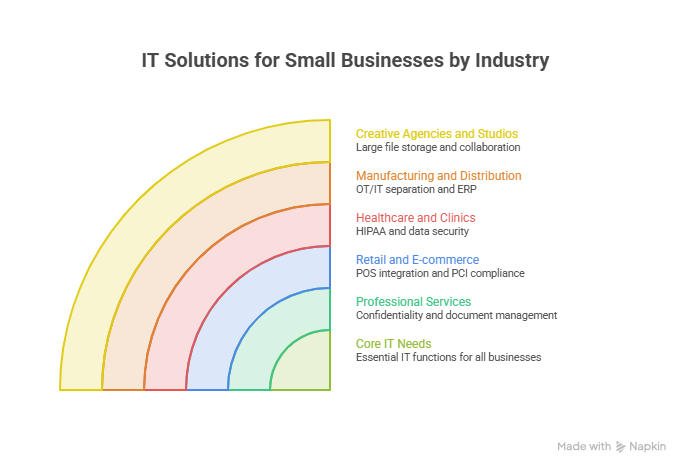
Generic advice only takes you so far. What a dental clinic needs from IT support services is not what a logistics broker needs. Here’s how the best IT solutions for small business owners differ by sector.
Professional Services (Law, Accounting, Consulting)
Confidentiality is the whole game. Document management with granular permissions, encrypted email, and client portals replace the attachment-flinging most firms still do. Retention policies matter for compliance. Practice management software — Clio for legal, Karbon for accounting — becomes the operational spine.
The most common failure I see here is document sprawl. Files live in email, on desktops, in three different Drive folders, and nobody can find the current version of anything. Fixing that single issue often delivers more measurable return than any security purchase.
Retail and E-commerce
Point-of-sale integration with inventory and accounting. PCI-DSS compliance is mandatory the moment you touch card data. Uptime is revenue — a checkout outage on a Saturday afternoon costs real money, so redundant connectivity earns its keep.
Seasonal scaling matters too. Your infrastructure needs to absorb a Diwali or Black Friday spike without collapsing.

Healthcare and Clinics
HIPAA in the US, DPDP Act in India, GDPR in Europe. Practice management and EHR integration. Encrypted patient communication. Audit logging that proves who accessed which record and when. This sector needs the most disciplined IT support services for small business practices — not because clinics are large, but because the regulatory exposure is severe and the data is irreplaceable.
Manufacturing and Distribution
Operational technology sits alongside information technology here, and the two need separating. Your CNC machines and your accounting network should not share a broadcast domain. ERP integration, barcode and RFID systems, and warehouse management make up the core stack.
Creative Agencies and Studios
Large files, fast storage, colour-accurate workstations, and collaborative review tools. Bandwidth is the bottleneck, not compute. Asset management systems prevent the classic agency problem of nobody knowing which version the client approved.
| Industry | Priority Investment | Biggest Risk | Typical Monthly Spend (10 users) |
| Professional services | Document management + encryption | Client data leak | ₹30,000–₹55,000 |
| Retail / e-commerce | POS + uptime redundancy | Checkout downtime | ₹25,000–₹45,000 |
| Healthcare | Compliance + audit logging | Regulatory penalty | ₹40,000–₹70,000 |
| Manufacturing | Network segmentation + ERP | Production stoppage | ₹35,000–₹60,000 |
| Creative agencies | Storage + bandwidth | Asset loss | ₹28,000–₹50,000 |
Building an Internal Technology Policy
Tools without rules produce chaos. Every company needs a handful of written policies, and they don’t have to be long — two pages beats forty pages nobody reads.
Acceptable Use
What employees can install, which devices can access company data, and whether personal devices are permitted. Bring-your-own-device policies need explicit boundaries around remote wipe rights.
Password and Access
Company-wide password manager, mandatory MFA, and a documented process for granting and revoking access. Tie offboarding to HR so departures automatically trigger access removal.
Data Classification
Not all data needs the same protection. Sort it into three buckets — public, internal, confidential — and apply controls accordingly. Trying to protect everything equally means protecting nothing well.
Incident Reporting
Employees need to know that reporting a suspicious click is safe and expected. A culture where people hide mistakes turns a contained incident into a breach. Make the reporting path obvious and blame-free.
Vendor Management
Maintain a register of every SaaS tool, its owner, its renewal date, and what data it holds. Most companies discover during this exercise that they’re paying for four tools that do the same thing.
Measuring Whether Your IT Investment Is Working
Owners often ask how to tell whether managed IT services for small business budgets are delivering value. Here are metrics worth tracking quarterly.
Mean time to resolution. How long from ticket raised to problem solved. Trending up means something’s wrong.
Ticket volume per user. Should fall over time as underlying issues get fixed. Flat volume across quarters suggests your provider is treating symptoms.
Unplanned downtime hours. Track it. Multiply by average loaded hourly wage. That’s your real cost of poor IT support for small business operations.
Patch compliance percentage. What proportion of endpoints are fully current. Aim above 95% within 30 days of release.
Backup restore success rate. Test quarterly. The number should be 100%, and if it isn’t, nothing else on this list matters.
Phishing simulation click rate. Should decline with training. A rate above 15% after two rounds of training means the training isn’t landing.
Percentage of spend on strategic vs reactive work. Mature setups run roughly 70% planned, 30% reactive. If you’re at 90% reactive, you’re firefighting, not managing.
Review these with your provider on a fixed cadence. Providers who welcome scrutiny tend to be the ones worth keeping.
What Changes in 2026 and Beyond
A few shifts worth planning around.
AI agents move from novelty to infrastructure. Support triage, document handling, and internal search are already production-ready and belong in any 2026 stack. Budget for business-tier licences with proper data agreements rather than letting staff use free consumer tools.
Passwordless authentication goes mainstream. Passkeys are supported across major platforms now. Expect password-based logins to feel dated within two years, and plan your rollout accordingly rather than reacting late.
Regulatory pressure increases. India’s DPDP rules are tightening enforcement. Data localisation requirements are expanding globally, and enforcement is no longer theoretical. Documentation of your controls becomes as important as the controls themselves.
Cyber insurance underwriting gets stricter. Insurers increasingly require evidence of specific controls. Your renewal questionnaire is effectively a free security audit — treat it that way.
Consolidation over sprawl. The trend is away from twelve point solutions toward two or three platforms that cover more ground. Fewer integration seams, fewer licences, fewer vendors to chase, and a noticeably smaller monthly bill at the end of it.