Pre-Article Message
Artificial intelligence is no longer something only large companies can afford. In 2026, small businesses can use AI to write content, answer customers, automate repetitive tasks, create designs, analyse data, manage finances, and improve team productivity.
However, there is one important point: buying more AI tools doesn’t automatically make a business more productive.
The smartest approach is to select a small number of tools that solve real business problems. This guide examines ten of the most useful artificial intelligence tools for small businesses and explains where each one can deliver practical value.
Comprehensive Article Outline
| Section | Topic | What You’ll Learn |
|---|---|---|
| 1 | Why AI matters in 2026 | How AI is changing small business operations |
| 2 | How to choose an AI tool | Key buying criteria |
| 3 | ChatGPT Business | AI for research, writing and business productivity |
| 4 | Microsoft 365 Copilot | AI inside everyday Microsoft work tools |
| 5 | Claude | AI for analysis, writing and complex documents |
| 6 | Canva Magic Studio | AI-powered visual content creation |
| 7 | HubSpot AI | AI for marketing, sales and customer management |
| 8 | Zapier | AI-powered workflow automation |
| 9 | QuickBooks AI features | Smarter financial and bookkeeping workflows |
| 10 | Notion AI | AI-powered knowledge and project management |
| 11 | Grammarly | AI assistance for business communication |
| 12 | Shopify AI | AI support for online stores |
| 13 | AI implementation strategy | How to introduce AI successfully |
| 14 | AI mistakes to avoid | Common buying and implementation errors |
| 15 | ROI measurement | How to measure the value of AI |
| 16 | Future trends | What small businesses should expect next |
| 17 | FAQs | Answers to common questions |
| 18 | Conclusion | Final recommendations |
Why Artificial Intelligence Tools for Small Businesses Matter in 2026
Small businesses have always faced the same challenge: there is never enough time, money, or manpower.
A large organisation can hire separate teams for marketing, finance, customer service, design, data analysis, and administration. A small business owner often handles several of these responsibilities personally.
That is where artificial intelligence has become a genuine game-changer.
Today’s AI tools can act as productivity assistants. They don’t replace business owners or experienced employees completely. Instead, they can reduce the amount of time spent on repetitive and routine work.
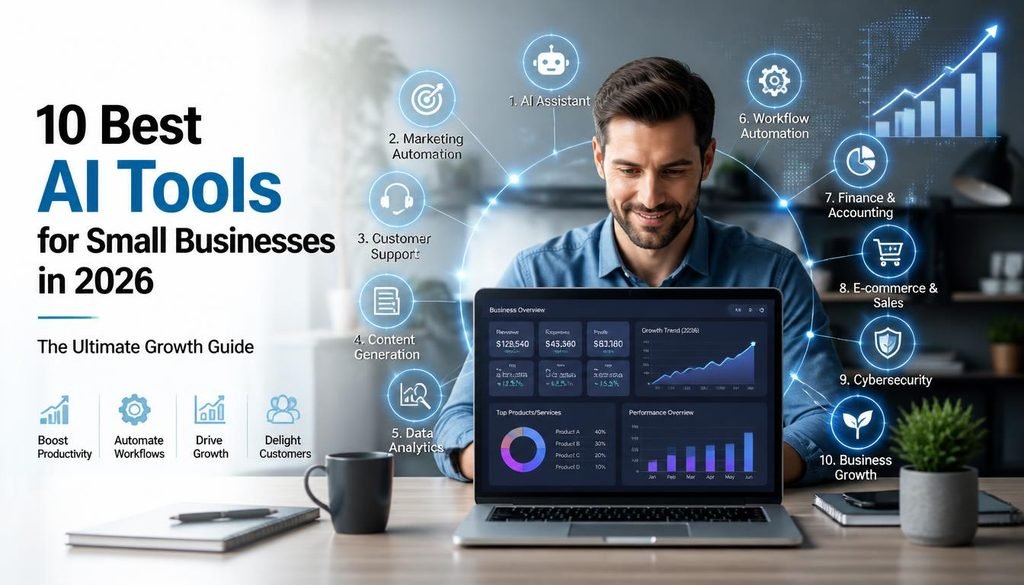
For example, AI can help a small business:
- Draft emails and proposals.
- Create marketing content.
- Summarise long documents.
- Analyse spreadsheets.
- Generate presentations.
- Create social media graphics.
- Respond to customer enquiries.
- Organise knowledge.
- Automate workflows.
- Improve product descriptions.
- Support financial administration.
The biggest advantage is speed.
A task that once required two hours may now take twenty minutes. A first draft that once required staring at a blank screen can be created within minutes. Data that would normally require manual sorting can be summarised quickly.
Still, AI isn’t magic.
The best results happen when humans remain involved. AI can create a draft, suggest an answer, organise information, or automate a workflow. A person should still check important outputs, especially when they involve customers, money, contracts, technical decisions, or confidential information.
In other words, the winning formula in 2026 is not simply AI versus people.
It is:
People using AI intelligently.
The following ten tools represent different business functions. You probably won’t need all of them. The goal is to identify which ones solve your biggest problems.
How to Choose the Right Artificial Intelligence Tool for Your Small Business
Before buying any subscription, ask one simple question:
What expensive problem will this tool solve?
Don’t buy an AI tool simply because it looks impressive.
Instead, identify a specific problem.
Common business problems and suitable AI categories
| Business Problem | AI Solution Category |
|---|---|
| Too much time spent writing | AI writing assistant |
| Too many repetitive tasks | AI automation |
| Slow content creation | AI design and content tools |
| Poor customer response time | AI customer support |
| Difficulty analysing data | AI analytics assistant |
| Unorganised company information | AI knowledge management |
| Too much manual administration | AI workflow automation |
| Weak online product descriptions | AI commerce tools |
Look for integration
The best AI tool is often one that works with software you already use.
For example:
- Microsoft-based companies may benefit from Copilot.
- Businesses using Google Workspace may prefer tools that fit their existing workflow.
- Online stores may benefit from AI inside their commerce platform.
- Teams with many different applications may benefit from automation tools.
Also Read : How to Use AI to Automate Tasks (2026 Guide to 10x Productivity)
Start with a small pilot
Don’t immediately buy licences for your entire company.
Instead:
- Select one department.
- Identify one workflow.
- Test the tool.
- Measure time saved.
- Collect employee feedback.
- Expand only when results are positive.
This approach reduces unnecessary spending and makes adoption much easier.
1. ChatGPT Business – Best Overall AI Productivity Assistant
For many companies, ChatGPT is one of the most flexible artificial intelligence tools for small businesses because it can support multiple business activities from one platform.
A small business can use it for:
- Research and brainstorming.
- Drafting emails.
- Creating proposals.
- Writing marketing copy.
- Summarising meetings.
- Preparing reports.
- Analysing information.
- Generating ideas.
- Creating process documentation.
- Supporting coding and technical work.
ChatGPT Business provides a shared workspace with administration and business-focused controls. Current official pricing information lists Standard and Premium seat options, with pricing varying by billing method and region.
Why it is useful for small businesses
The biggest strength is flexibility.
Instead of purchasing separate tools for brainstorming, basic writing assistance, document summarisation, and idea generation, one AI assistant can support several workflows.
Example use case
Imagine a small construction or technology company preparing a proposal.
The team can use AI to:
- Organise customer requirements.
- Create a proposal structure.
- Draft an executive summary.
- Suggest technical questions.
- Improve grammar and clarity.
- Create a presentation outline.
The final document should still be reviewed by experienced professionals. However, the preparation process can become much faster.
Best for
Businesses that need a versatile AI assistant across several departments.
2. Microsoft 365 Copilot – Best for Microsoft-Based Businesses
Microsoft 365 Copilot Business
If your company already works heavily with Word, Excel, PowerPoint, Outlook, and Teams, Microsoft 365 Copilot may be one of the easiest AI investments.
Microsoft positions Copilot Business as AI integrated into the Microsoft 365 work environment, including applications such as Word, Excel, PowerPoint, Outlook, and Teams.
Where Copilot can help
Word
It can assist with:
- Drafting documents.
- Rewriting content.
- Creating summaries.
- Improving structure.
Excel
It can help users understand and work with data more efficiently.
PowerPoint
It can support presentation development and content preparation.
Outlook
It can help manage communication and draft responses.
Why small businesses should consider it
Employees don’t need to move constantly between different software platforms. AI becomes part of tools they already understand.
That’s important because adoption is often the biggest challenge.
A powerful AI tool is useless if employees don’t use it.
Best for
Companies already paying for and heavily using Microsoft 365.
3. Claude – Best for Deep Thinking, Writing and Document Analysis
Claude is another important AI assistant for businesses that work extensively with written information.
It can be useful for:
- Long documents.
- Business reports.
- Research preparation.
- Policy documents.
- Proposal analysis.
- Content development.
- Brainstorming.
Why this matters
Small businesses often have important information scattered across:
- PDFs.
- Reports.
- Contracts.
- Customer requirements.
- Meeting notes.
- Technical documentation.
An AI assistant can help users organise and understand information faster.
However, this comes with an important warning.
Never blindly trust AI summaries
If a document involves:
- Legal obligations.
- Financial commitments.
- Technical specifications.
- Safety requirements.
- Customer contracts,
a qualified person must review the original information.
AI can speed up understanding. It should not become an unquestioned decision-maker.
Best for
Professional services, consultants, researchers, agencies, and knowledge-heavy businesses.
4. Canva Magic Studio – Best for Marketing and Visual Content
Small businesses need visual content more than ever.
Customers interact with businesses through:
- Social media.
- Websites.
- Presentations.
- Advertisements.
- Product pages.
- Email campaigns.
Hiring a designer for every small requirement can be expensive. This is where AI-powered design tools can be useful.
Canva’s AI features can support faster content creation and help teams create visual assets without advanced design skills.
Useful business applications
A small business can create:
- Social media posts.
- Marketing presentations.
- Posters.
- Basic advertisements.
- Infographics.
- Business documents.
- Video content.
The real benefit
The biggest benefit isn’t necessarily replacing professional designers.
It is allowing small teams to produce everyday visual content faster.
A professional designer may still be needed for:
- Major brand development.
- Complex advertising campaigns.
- High-end product design.
- Important corporate presentations.
Best for
Marketing teams, local businesses, consultants, educators, and social media-focused brands.
5. HubSpot AI – Best for Marketing and Customer Growth
Marketing and sales can become difficult when a small business begins to grow.
Customer information gets spread across:
- Spreadsheets.
- Email accounts.
- Messaging platforms.
- Sales notes.
A customer relationship management platform can bring these activities together, while AI features can assist with content, sales and marketing workflows.
Potential benefits
AI can help support:
- Lead management.
- Marketing content.
- Customer communication.
- Sales productivity.
- Campaign planning.
Why this is valuable
Small businesses often lose opportunities because follow-up is inconsistent.
An organised system can help ensure that potential customers don’t simply disappear after the first enquiry.
Best for
Growing businesses with regular sales leads and active marketing operations.
6. Zapier – Best for AI-Powered Business Automation
Automation is where AI can produce some of the biggest productivity gains.
Zapier connects different applications and helps businesses create automated workflows. According to Zapier, its platform supports AI-powered automation and connects with thousands of applications.
Example automation
Imagine this process:
- A customer submits a website form.
- Their information enters a CRM.
- AI categorises the enquiry.
- The correct team receives a notification.
- A follow-up task is created.
- The enquiry is added to a reporting system.
Without automation, employees may perform several manual steps.
With a properly designed workflow, much of the routine work can happen automatically.
AI agents and automation
Zapier also provides tools for building AI agents that can perform tasks using connected applications and information sources.
Best for
Businesses using multiple cloud applications and spending too much time moving information between systems.
7. QuickBooks – Best for Smarter Financial Administration
Financial administration is one of the least glamorous parts of running a business, but it is absolutely essential.
Small businesses often spend significant time on:
- Invoices.
- Expense records.
- Financial reports.
- Cash-flow monitoring.
- Bookkeeping preparation.
AI-enhanced accounting tools can help reduce manual work and make financial information easier to understand.
Important limitation
AI should not replace a qualified accountant or financial professional.
Businesses should still ensure that:
- Tax rules are followed.
- Financial records are accurate.
- Compliance requirements are met.
- Important transactions are reviewed.
Best for
Small businesses that want to reduce manual administrative work around routine financial processes.
8. Notion AI – Best for Knowledge Management and Team Organisation
As companies grow, information becomes difficult to manage.
Employees may ask:
- Where is the latest process document?
- What happened in the last project meeting?
- Which version of the proposal is correct?
- How do we perform this task?
A knowledge management platform can create a central location for company information.
AI can make that information easier to search, summarise, and use.
Useful applications
Small businesses can create:
- Employee handbooks.
- Standard operating procedures.
- Project documentation.
- Meeting notes.
- Training resources.
- Company knowledge bases.
Best for
Teams that need better organisation and a central knowledge system.
9. Grammarly – Best for Professional Business Communication
Poor communication can damage a business.
A badly written email, proposal, or customer response can make a professional company appear careless.
Grammarly can help improve:
- Grammar.
- Spelling.
- Clarity.
- Tone.
- Writing consistency.
Why it is valuable
Not every employee is a strong writer.
AI writing assistance can help employees communicate more clearly without requiring every message to go through a senior manager.
However, employees should still use common sense.
A message may be grammatically correct but emotionally inappropriate. For example, a customer complaint requires empathy, not just perfect grammar.
Best for
Businesses with customer-facing teams, sales teams, consultants, and international communication.
10. Shopify AI – Best for Small E-Commerce Businesses
E-commerce businesses face a constant content challenge.
Every product may need:
- A title.
- A description.
- Marketing copy.
- Images.
- Customer information.
AI can help reduce the time required to create and manage product-related content.
Practical applications
AI can support e-commerce businesses with:
- Product descriptions.
- Marketing content.
- Customer communication.
- Store management.
- Content ideas.
Best for
Small online retailers and businesses planning to expand their digital sales operations.
How to Build the Right AI Stack Without Wasting Money
The biggest mistake is subscribing to ten different AI platforms.
Instead, build a simple stack.
A basic small-business AI stack
Option A: Service business
- ChatGPT or Claude for productivity.
- Canva for visual content.
- Grammarly for communication.
- Zapier for automation.
Option B: Microsoft-based company
- Microsoft 365 Copilot.
- Canva.
- Zapier.
- A CRM platform.
Option C: E-commerce business
- Shopify AI features.
- ChatGPT for marketing.
- Canva for content.
- Automation tools for workflows.
The goal is not to have the largest technology stack.
The goal is to have the most useful stack.
How to Measure the Return on Investment of AI
Before buying an AI tool, establish a baseline.
For example:
Measure time
Ask:
- How long does this task take today?
- How many employees perform it?
- How often is it performed?
Measure cost
Use a simple formula:
Monthly AI value = Time saved × Employee hourly cost
For example, if an employee saves 20 hours each month and the effective cost of that employee’s time is ₹500 per hour:
20 × ₹500 = ₹10,000 in potential monthly productivity value
This doesn’t necessarily mean the company receives ₹10,000 in cash. However, it means that employee capacity can potentially be redirected toward more valuable work.
Common AI Mistakes Small Businesses Should Avoid
Buying too many subscriptions
Start small.
Using confidential information carelessly
Always understand a platform’s business data and privacy policies before uploading sensitive information.
Trusting AI without review
AI can make mistakes.
Automating a broken process
Don’t automate chaos.
First improve the process. Then automate it.
Ignoring employee training
AI tools require people to learn:
- How to ask better questions.
- How to review outputs.
- When not to trust AI.
- How to protect confidential information.
The Future of Artificial Intelligence Tools for Small Businesses
The next phase of AI is likely to move beyond simple chatbots.
Businesses are increasingly moving toward AI systems that can assist with complete workflows.
Instead of asking AI only to:
“Write an email.”
Businesses may increasingly ask:
“Review today’s customer enquiries, classify urgent leads, prepare draft responses, and create follow-up tasks.”
This is where AI agents and automation will become increasingly important.
The businesses that benefit most probably won’t be the ones that buy the most expensive AI software.
They will be the ones that:
- Understand their processes.
- Identify repetitive work.
- Protect important data.
- Train employees.
- Measure results.
- Improve continuously.
Frequently Asked Questions
1. What are the best artificial intelligence tools for small businesses in 2026?
The best tool depends on the business. ChatGPT Business is a strong general-purpose option, Microsoft 365 Copilot suits Microsoft-based teams, Canva supports marketing content, and Zapier helps automate workflows.
2. Can a small business afford AI tools?
Yes. Many AI platforms offer different subscription levels. Small businesses should begin with one or two tools that solve clear problems instead of buying many subscriptions.
3. Will AI replace small business employees?
AI is more likely to change many jobs than completely eliminate them. It can automate repetitive tasks and help employees work faster. Human judgement, relationships, experience, and accountability remain important.
4. What should a small business automate first?
Start with repetitive, rule-based tasks such as lead routing, data movement, routine follow-ups, content drafts, and basic reporting.
5. Is AI safe for confidential business information?
It depends on the platform, account type, security controls, and the type of information being shared. Businesses should review privacy and data-handling policies before uploading confidential information.
6. How many AI tools does a small business need?
Most businesses should start with two to four carefully selected tools. A simple stack is usually easier to manage and provides better value than many disconnected subscriptions.
7. How can I train my employees to use AI?
Start with practical workshops based on real business tasks. Teach employees how to write effective prompts, verify results, protect sensitive information, and recognise AI mistakes.
8. What is the biggest benefit of AI for small businesses?
The biggest benefit is increased capacity. AI can help a small team complete more useful work without proportionally increasing the number of employees.
Conclusion: Which AI Tool Should Your Small Business Buy First?
The answer depends on your biggest business problem.
If you want one flexible productivity assistant, ChatGPT Business is a strong starting point.
If your team already works heavily in Microsoft applications, Microsoft 365 Copilot may provide a more natural experience.
If your biggest problem is repetitive work between different applications, Zapier deserves serious consideration.
For marketing and visual content, Canva can help small teams move faster.
The most important lesson is simple:
Don’t buy AI because it is trending. Buy AI because it solves a measurable business problem.
Start small, train your team, measure the results, and expand only when the technology is delivering genuine value.
In 2026, artificial intelligence is no longer just a technology trend. For small businesses that use it carefully and strategically, it can become a practical partner for productivity, growth, and better decision-making.